.png)
Marketing Automation Strategy: A Step-by-Step Guide
.png)

.png)

To build a scalable marketing automation strategy, start with clean and connected CRM data, track customer interactions accurately, and design workflows around each stage of the buying journey. Use past sales data to set lead-scoring rules, and focus on metrics that show real business impact—such as pipeline growth and revenue contribution—rather than just email opens and clicks.
Key Takeaways
- Automation is only as good as your data. Bad data means irrelevant messages sent at scale.
- Lead scoring needs to be tested against real deals — not just set up and left alone.
- Your attribution window (how far back you track a lead’s journey) needs to match your actual sales cycle.
- AI tools work better when your data is clean. Don’t skip server-side tracking setup.
- Measure pipeline and cost per qualified lead — not email open rates.
What Is Marketing Automation?
Marketing automation is software that sends the right message to the right person at the right time — automatically, based on what they do.
Instead of manually emailing every lead, you set up rules: “if someone downloads our pricing guide, wait two days, then send them a case study.” The system handles the rest.
It covers things like:
- Email sequences triggered by contact behaviour
- Lead scoring (tracking how sales-ready a contact is)
- Alerts your sales team when a lead hits a key threshold
- Re-engagement campaigns for contacts who’ve gone quiet
- Personalised content that changes based on who’s reading it
The key difference from basic email marketing: automation responds to what your contacts do, not when your calendar says to send something.
How Marketing Automation Works?
Traditional automation relied on simple triggers—for example, sending a follow-up email three days after a recipient opened a message.
Modern platforms like HubSpot, Marketo, Salesforce Marketing Cloud, and ActiveCampaign now do a lot more:
Behavioural scoring: Every action a contact takes, clicking a link, visiting a page, attending a webinar, earns them points. The system tracks a running total so you always know how engaged someone is, without checking manually.
Predictive lead prioritization: AI looks at your past closed deals and identifies which current leads look most similar. It then ranks leads automatically, so your sales team knows who to call first.
Dynamic content: The same email or page can show different content to different people based on their industry, role, or stage in the buying process without you having to create separate campaigns.
The other big change is data. Apple’s iOS 14.5+ update and Google’s Privacy Sandbox have made it much harder to track people across websites. That means platforms can’t rely on outside data sources the way they used to.
First-party data — information you’ve collected directly from your own customers and contacts — is now the most reliable source for personalization, lead scoring, and targeting.
The bottom line: better data equals better automation. A simple workflow on a clean CRM will outperform a complex setup built on messy contact records.
What This Guide Covers
This guide walks you through building a marketing automation strategy that generates real pipeline — not just activity. Here’s what we cover:
- How to set goals tied to revenue (not vanity metrics)
- What data do you need before you build anything
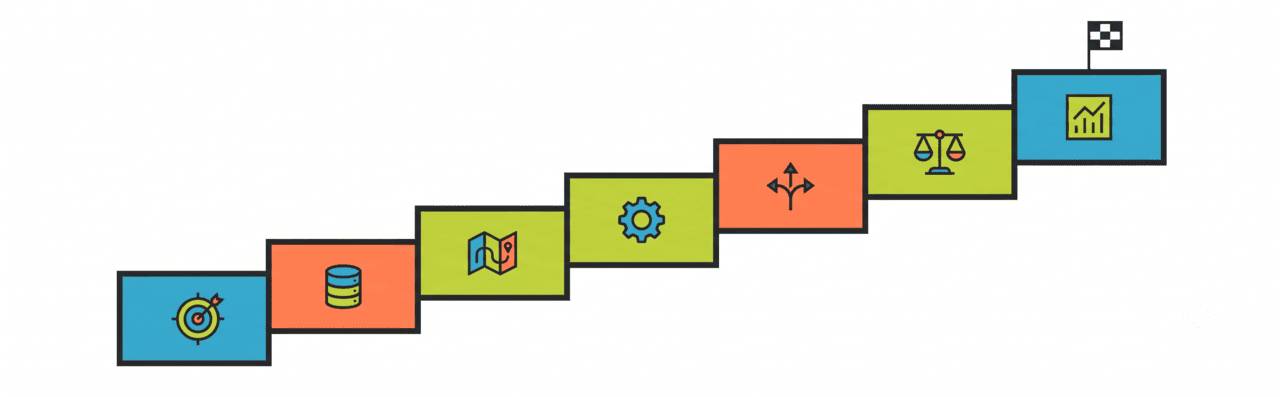
- Seven steps from zero to a working programme
- How to pick the right platform for your size and budget
- What good results actually look like
- Where automation commonly breaks down
- When you’re ready to scale
How to Build a Marketing Automation Strategy Step by Step
Step 1: Set Goals Tied to Revenue
The most common mistake in marketing automation is building tools without knowing what they’re supposed to achieve commercially.
Before you touch a platform, define what success looks like. Most programmes are built for one of five things:
Each goal needs a different workflow structure. A sequence built to get more leads will look completely different from one built to turn leads into sales conversations.
Step 2: Sort Your Data Before You Build Anything
Marketing automation amplifies the quality of your CRM data. When your data is accurate and up to date, automation delivers relevant messages at the right time. When your data is incomplete or inaccurate, automation can quickly spread mistakes, sending irrelevant messages to large audiences.
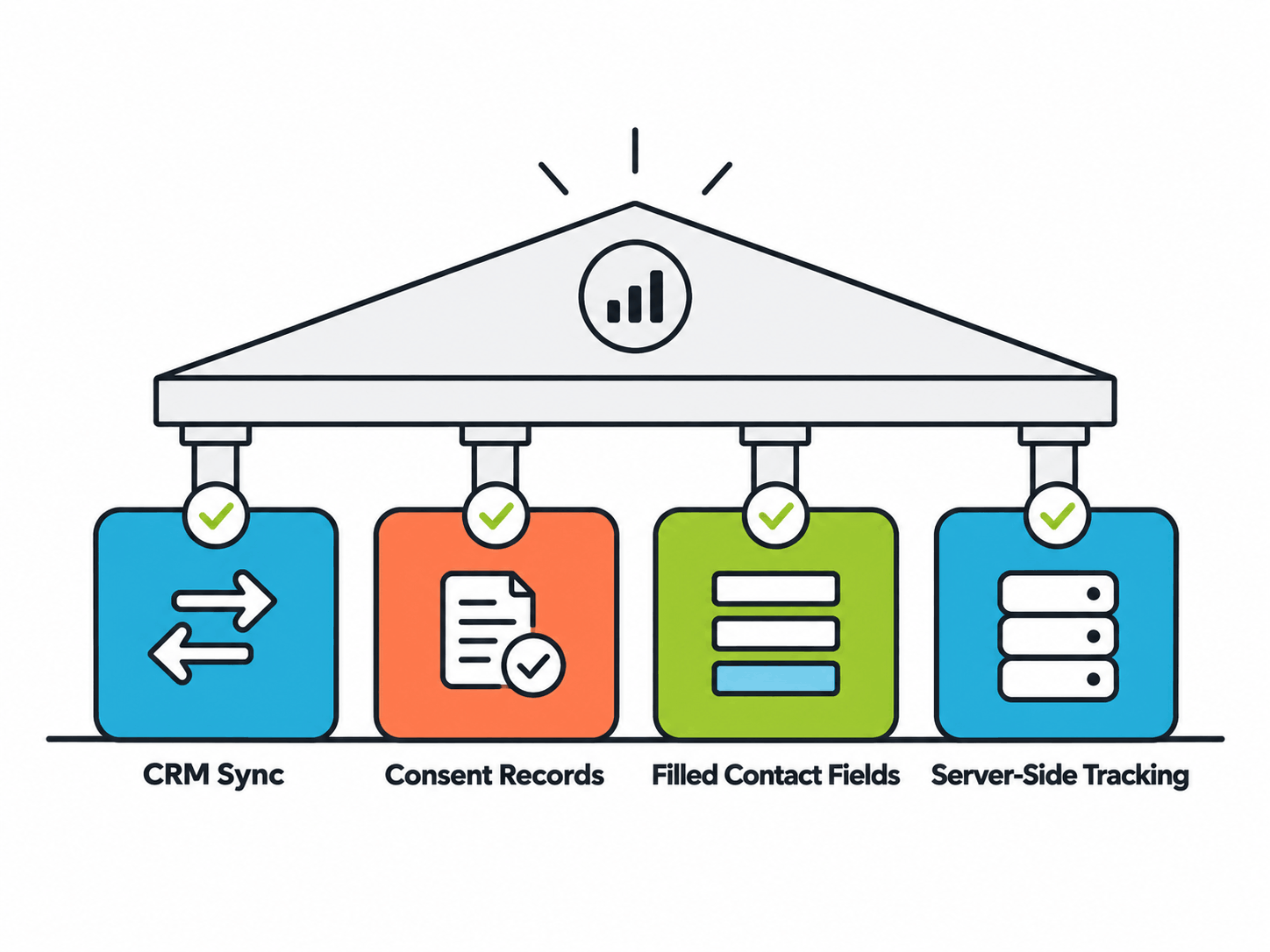
Four things need to be in place before you go live:
Two-way CRM sync: Your automation tool and CRM need to talk to each other in real time — not just once a day in a batch update.
Consent records: Email laws in Australia (Spam Act), the US (CAN-SPAM), and across APAC require you to have permission before automating. No consent data = legal risk at scale.
Filled contact fields: Lead scoring and segmentation only work if your contacts have data in fields like industry, company size, and job title.
Server-side tracking: Standard browser tracking is being blocked by iOS updates and ad blockers. Server-side tracking captures behaviour directly through your own infrastructure, so you don’t lose data when someone’s browser blocks the usual scripts.
Teams that skip this and start building on imported lists usually see the same pattern: great open rates at first, then a steady decline within six weeks, and a lead scoring model that flags unqualified contacts.
Step 3: Map the Journey Before Building Workflows
Write out every step a contact takes from first hearing about you to signing a deal. Then decide which of those steps automation should actually touch.
This stops the most common mistake: automating what’s easy instead of what actually moves people forward.
In a typical B2B journey, automation can help with content delivery, follow-up sequences, and sales alerts. It can’t help with procurement reviews or contract negotiations. Knowing the difference shapes the whole programme.
Step 4: Pick Your Platform
Choose your platform after you’ve mapped your strategy and data — not before. The platform you pick determines what workflows and scoring logic are even possible, so this decision needs to happen before you start building.
In our experience reviewing mid-market CRM setups, teams that picked a platform before defining their goals almost always needed to rebuild within 18 months.
For most SME and mid-market teams, the choice comes down to: do you need simplicity and speed, or deep functionality for complex programmes?
Switching platforms is painful and expensive. Pick one that fits where you are now, with room to grow.
Step 5: Build Workflows Around Where People Are in Their Decision-Making
The difference between automation that generates a pipeline and automation that just generates activity comes down to what triggers it.
Action-based triggers (e.g. “send an email when someone opens the last email”) keep people engaged inside the system. They don’t necessarily move them closer to buying.
Stage-based triggers (e.g. “send a case study when someone has visited the pricing page twice and downloaded a comparison guide”) push people toward a commercial decision.
Stage-based triggers need a lead scoring setup that combines what people do (pages visited, content downloaded, webinars attended) with who they are (job title, company size). For most SMEs, scoring three to five key behaviours covers most of the value.
One reality check: dynamic, personalized content only works if you have the content to back it up. If you don’t have a dedicated content resource, start with two or three workflow variations — not ten.
Every workflow also needs a clear exit point: when a contact converts, goes cold, or gets disqualified by sales. Without it, you’ll keep messaging people who have already moved on — and they’ll unsubscribe.
Step 6: Set Up Lead Scoring and Sales Handoff
Lead scoring decides when your automation stops and your sales team steps in. If the threshold is too low, sales get flooded with unqualified leads and stop trusting marketing.
The right way to calibrate scoring: look at contacts from deals you actually closed, and see which actions they took. Pricing page visits, demo requests, and competitor comparisons show up consistently in closed-won histories. Blog reads rarely predict intent but show up in scoring models because they’re easy to track.
In the B2B mid-market, a well-calibrated model typically converts 10–20% of marketing-qualified leads into sales conversations. This varies by industry, deal size, and sales cycle — use it as a benchmark, not a guarantee. Below 10% usually means your threshold is too low. Above 30% might mean it’s too high and you’re slowing down the pipeline.
Step 7: Measure What Actually Matters
Most platforms default to showing you open rates, clicks, and form fills. These tell you how healthy your system is — not whether it’s generating revenue.
The numbers that matter: how many marketing-qualified leads become sales conversations, what it costs per qualified lead, and how much pipeline your automation has influenced.
A simple test: hold back 10–15% of a segment from a nurture sequence for 60 days and compare how both groups convert. If the group that received the automation converts at a meaningfully higher rate, it’s working. If the rates are similar, you’re taking credit for conversions that would have happened anyway.
This takes less than a quarter to run and usually shows that two or three workflows are doing most of the heavy lifting.
How Automated Workflows Support the Entire Buyer Journey
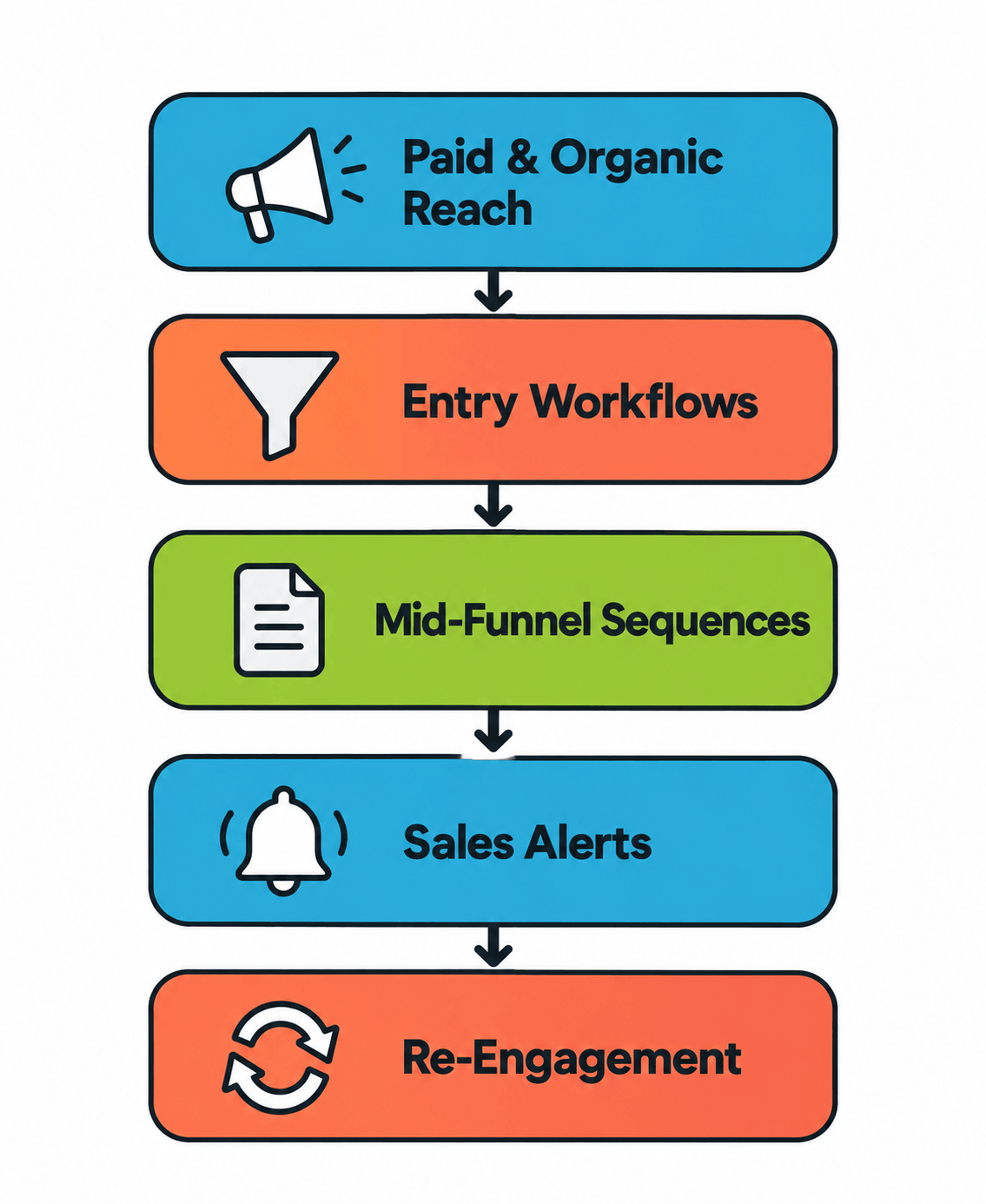
Individual workflows don’t produce results on their own. The value comes from how they connect.
Here’s a simple example: when a contact registers for a webinar, three things should happen automatically — your sales team gets an alert, any top-of-funnel educational emails pause (so you’re not overlapping messages), and the contact enters a post-webinar follow-up sequence. Three workflows working together. None of them would be as effective running independently.
A full system works in layers:
- Paid and organic channels bring in top-of-funnel contacts
- Entry workflows capture intent and route contacts to the right track
- Mid-funnel sequences deliver content based on the buying stage, with scoring updating in real time
- Sales alerts fire when a contact hits the MQL threshold, with context on what they’ve read and visited
- Re-engagement workflows catch contacts who’ve gone quiet before archiving them
Systems fail at the connection points — not inside the workflows. Leads with no follow-up workflow. Nurture sequences that don’t update the CRM. Scoring models that drift toward measuring email activity instead of buying intent.
Key Marketing Automation Metrics to Track
Use these benchmarks as general reference points rather than fixed targets. Actual performance varies based on industry, audience, deal size, and programme maturity.
- Email open rates: 20–35% for B2B nurture sequences with clean lists and relevant content
- Click-through rates: 2–5%
- MQL-to-SQL conversion: 10–20% for mid-market B2B; up to 25–35% for faster SMB deals
- Cost per lead: programmes running on clean first-party data have, in some cases, seen 30–50% lower cost per lead vs. paid acquisition alone — but this depends heavily on your data quality and content
- Pipeline influenced: 40–70% of revenue in organisations running automation for 12+ months
Pipeline influenced vs. pipeline generated: Pipeline influenced refers to opportunities where marketing automation contributed at some point during the buyer journey. Pipeline-generated refers to opportunities that originated directly from automation-driven marketing activities.
Why Marketing Automation Fails (And How to Prevent It)
Most failures aren’t about the platform or the strategy. They’re about the infrastructure underneath.
Another major challenge is signal loss, which occurs when marketers can no longer track user actions as accurately as before due to privacy restrictions and reduced access to third-party data. Updates such as Apple’s iOS 14.5 privacy changes and Google’s Privacy Sandbox have limited the amount of behavioral data available for targeting, attribution, and performance measurement.
In email marketing, Apple Mail Privacy Protection (MPP) can automatically register email opens before recipients actually read a message, inflating open rates and making them less reliable. As a result, marketers should rely more on metrics such as clicks, website visits, form submissions, and conversions, which provide a more accurate view of audience engagement and campaign performance.
When to Optimize, Pause, or Scale Marketing Automation
Scale when:
- Your MQL-to-SQL conversion rate is stable and meets your sales team’s quality bar
- Your data supports accurate segmentation
- At least one holdout test has confirmed the programme is generating real lift
Pause or restructure when:
- MQL-to-SQL drops below 10% for two quarters in a row
- Sales consistently tells you the leads aren’t qualified
- Unsubscribe rates on nurture sequences go above 0.5% per send
Marketing Automation Readiness Checklist
Before you scale spend or add platform complexity, confirm these are in place:
Conclusion
Marketing automation works when it’s built as a connected system — not a bunch of standalone email sequences. The data, the CRM sync, the lead scoring, and the measurement framework aren’t technical details. They’re what determine whether you’re generating pipeline or just generating activity.
Set your goals first. Sort your data before building. Validate your scoring against real closed deals before scaling. Automation built in the right order is far easier to fix and improve than one that skipped the foundations.
Frequently Asked Questions
What is a marketing automation strategy?
A plan for using automation to connect your marketing activity to revenue. It defines which workflows to build, what data to collect, and how to measure whether it’s actually contributing to closed deals.
How long until you see results?
Faster lead follow-up and reduced manual work show up within 30–60 days. Pipeline-level results typically take three to six months as your scoring model builds up enough data to work properly.
What’s a realistic lead-to-sales conversion rate?
For B2B mid-market with a calibrated scoring model, 10–20% is a common range. It varies by industry and deal complexity — use it as a benchmark. Consistently below 10% means your threshold is too loose.
Does it work without a CRM?
Technically, yes, but the quality drops significantly. Without a CRM connection, you can’t incorporate deal-stage data into scoring, and you can’t connect automation touchpoints to actual revenue.
Which platform is best for small businesses?
HubSpot and ActiveCampaign are the most common starting points. Both combine automation with built-in CRM at accessible price points. Pick based on your strategy and data readiness, not feature lists.
How do you measure ROI?
Track pipeline generated from automation-sourced leads, your lead-to-sales conversion rate, and cost per qualified opportunity. Open rates and lead volume tell you the system is running — not whether it’s working commercially.
Read These Next
B2B Marketing Attribution: A Complete Guide for Modern B2B Teams